


How To Check If Your Photos Meet Facebook’s 80/20 Rule For Facebook Ads
If you run Facebook ads, then you may have already had some ads rejected due to Facebook’s notorious 80/20 rule.
Not sure what the 80/20 Rule is?
As part of one of Facebook’s (many) terms and conditions you are not allowed to promote sponsored news feed posts that covered with more than 20% of the image. This was a real challenge, as what typically happens is that you would choose to boost your post and select how much you want to spend, but shortly afterwards the promotion stops and you were left scratching your head what went wrong and why your post was rejected.
Who could tell if the text covered 20% or not just by looking at the image?
Sure you could give a guess…but that is all it was and if you had to guess, it probably meant that you were not going to get past the Facebook axe.
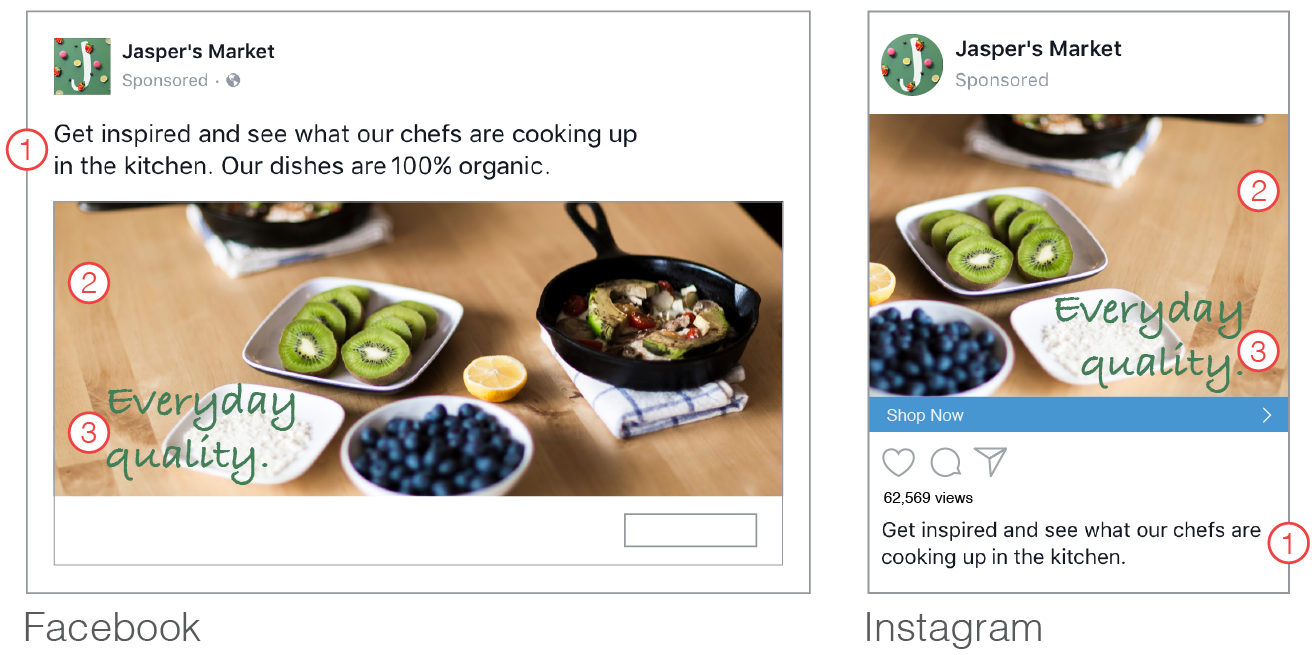
Below you’ll find an example of image text.
1) Body text
2) Ad image
3) Image text
Don’t Worry – Help is at hand!
Facebook actually have a new tool where you can actually measure this 80/20 ratio.
You can use the FREE Tool Here:I want to measure my 80/20 Ratio
How It Works

When you enter the page, you choose an image to upload and click the view grid button.
Once the image is uploaded you can click squares in the grid which contain text.
A percentage figure is then displayed on the right hand side and this figure lets you know if your image is over 20% or not.
The squares selected turn red, so you can clearly see if your image is compliant or not.
This 80/20 rule also applies to your Facebook cover image, so if your cover image has more than 20% of text, you are actually outside their terms or service.
We have been using it the past few days and one thing is fairly obvious, 20% is not a lot of space, just enough for a headline really. However one thing is for sure, this is a very welcome tool which will help avoid the frustration of having your sponsored post stopped.
You can use the FREE Tool Here:I want to measure my 80/20 Ratio
